Documenting the things I build, deploy, and continuously improve.
Building software, infrastructure, and everything in between.
I'm a Data Science student at NITK Surathkal with a strong interest in backend engineering, distributed systems, and cloud infrastructure. I build AI-powered applications, developer tools, and scalable backend services while exploring the technologies that power them.
Alongside my projects, I maintain a self-hosted infrastructure where I experiment with Linux, Docker, networking, reverse proxies, databases, and automation. This website documents my work, technical explorations, open-source contributions, and the systems I continue to build and improve.

Experience & Education
The experiences that shaped my skills and perspective.
National Institute of Technology Karnataka, Surathkal
Focusing on Computational Mathematics, Data Structures, Algorithms, Machine Learning, and Systems Engineering.
- —Studying core theoretical and practical computer science, advanced algebra, database management, and network models.
- —Applying academic systems theory to hands-on lab environments and container orchestration platforms.
Katha AI
Industry Project under Prof. Mohit P. Tahiliani, CSE Department, NITK
- —Architected Django REST + React services with a model spanning 20+ entities, backed by PostgreSQL.
- —Engineered production-grade media infrastructure using Cloudflare R2, implementing dual-bucket isolation, environment-driven django-storages routing, CDN delivery, and pre-signed URL access for protected assets.
Web Enthusiasts’ Club, NITK
Managing campus systems infrastructure, orchestrating CTF competitions, and leading SIG workflows.
- —Promoted from Systems SIG Executive (Sep 2025–Mar 2026) to Systems SIG Secretary (Apr 2026–Present).
- —Designed and managed the infrastructure for WECCTF, serving 400+ participants using CTFd with support for static and 10+ Docker-based challenges.
- —Architected a hybrid deployment by combining institutional servers with a remote Azure Docker Engine, enabling scalable containerized challenge hosting.
- —Built the WECCTF Archive with challenge write-ups and solutions.
- —Contributed to the open-source CTFd Docker Challenges Plugin.
180 Degrees Consulting, NITK
Building and deploying full-stack web applications for real-world clients.
- —Built an AI-powered analytics dashboard for an EdTech client, translating business requirements into performance analytics, advanced filtering, LLM-powered insights, and interactive visualizations.
- —Integrated Cloudflare Workers and LiveKit Agent to support scalable AI workflows and prod deployment
Selected Work
A collection of projects built to solve real problems through thoughtful engineering.
AI agents are busy polishing the pixels. Interface preview will render soon.
OpportuneAI
An AI-powered job discovery and application copilot that aggregates opportunities from multiple job platforms and transforms unstructured listings into structured, searchable data. It combines large language models with an intelligent background worker pipeline to recommend the most relevant opportunities based on a candidate's resume, skills, and preferences.
Architected a modular AI-powered job aggregation platform featuring provider-based ingestion, content-hash deduplication, asynchronous processing with Redis Queue, and resume-aware job ranking.
Railsplit
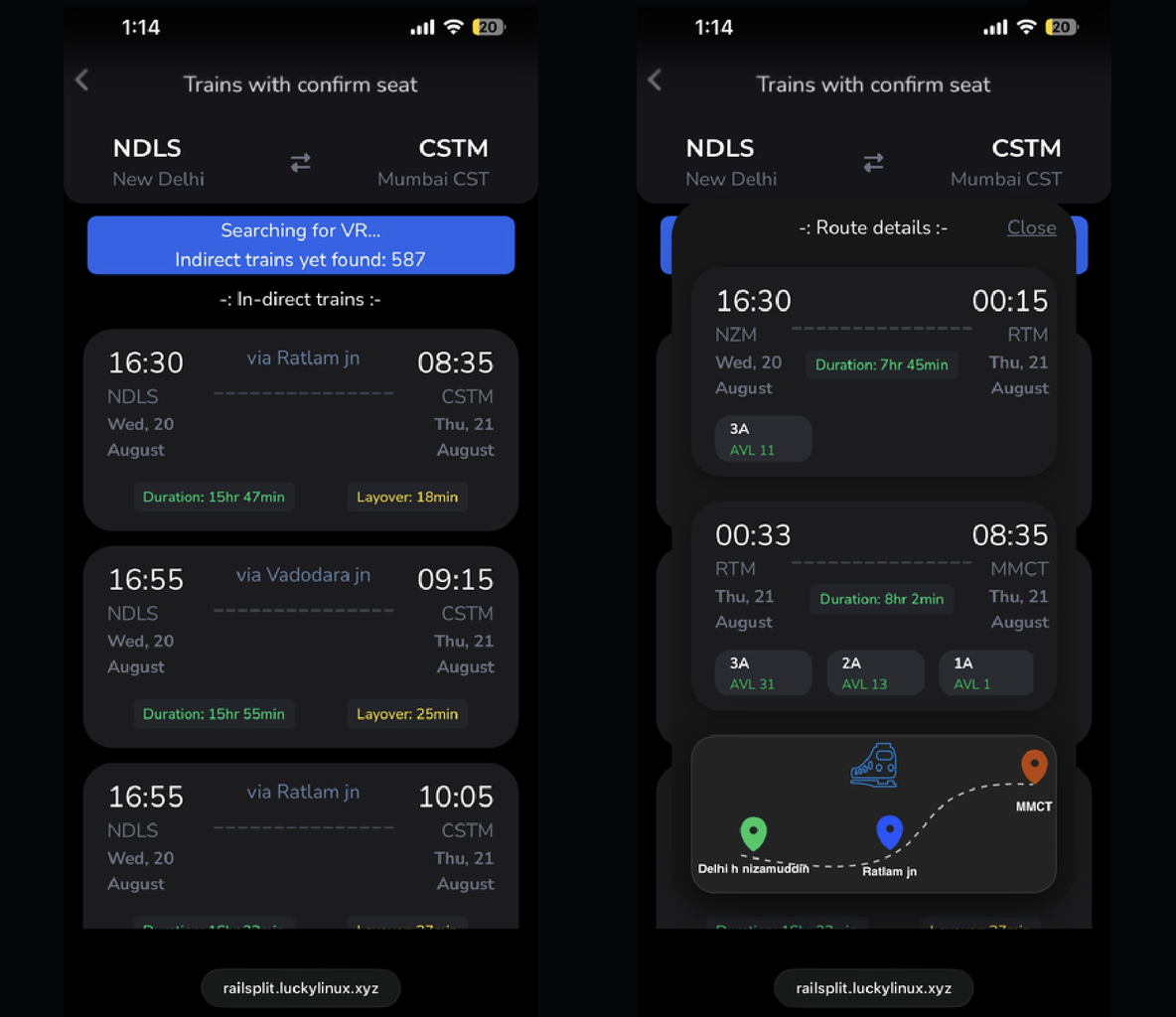
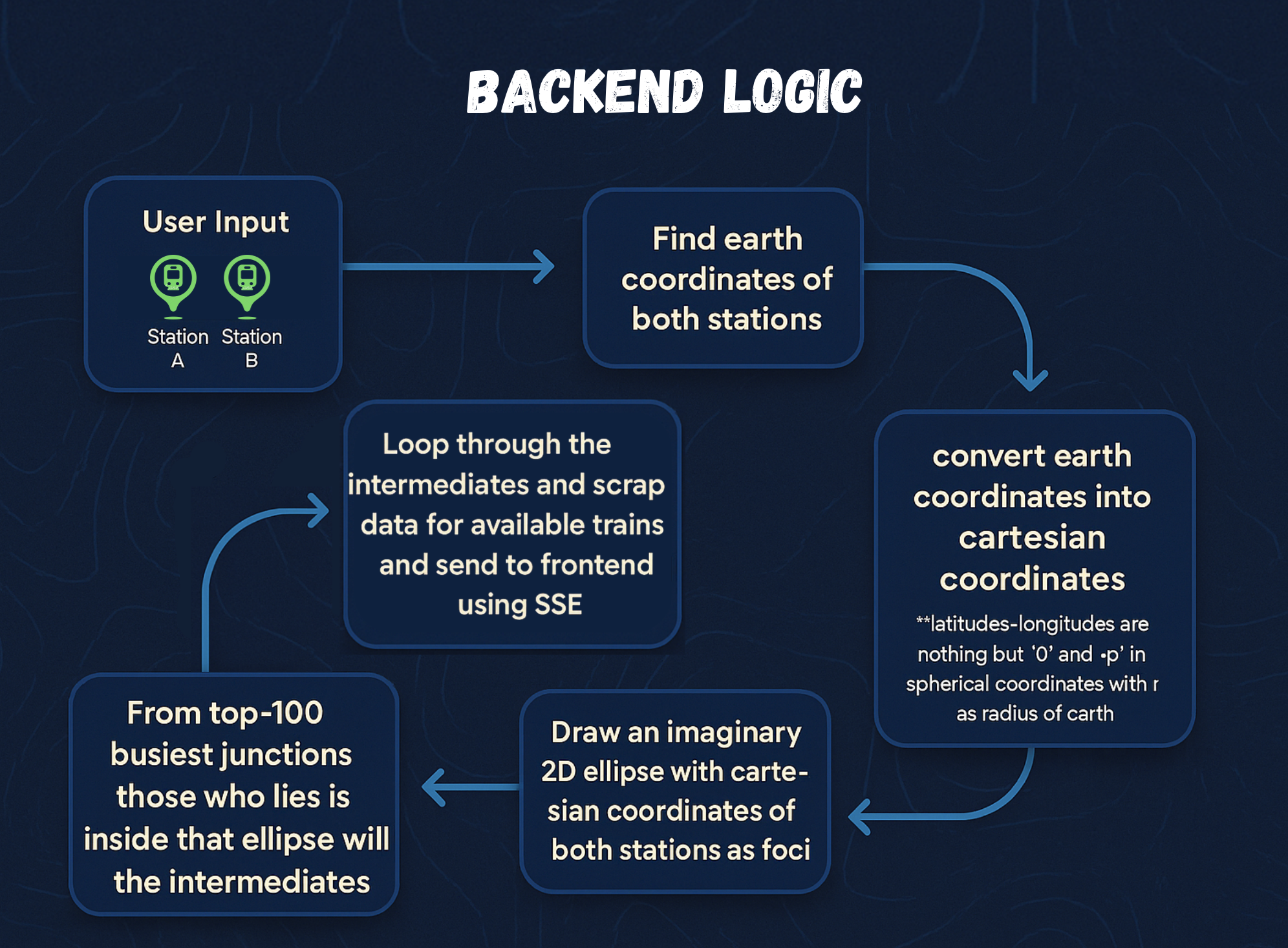
An intelligent transit engine designed to solve the Indian Railways waitlist dilemma. By parsing journey maps, identifying efficient intermediate junctions, and analyzing availability datasets, it helps travelers find confirmed tickets via split-booking legs.
Designed a custom search-space pruning algorithm using ellipse-constrained station selection for fast split-route optimization.
ChronoCare
A health management platform featuring a clickable 3D human body mapper mapping medical history and timeline. It integrates an Agentic RAG chat assistant to resolve patient queries securely based on localized medical records.
Built an interactive 3D human body mapper synced with relational schemas, integrated with a vector database RAG search pipeline.
SysSight
A robust, real-time system monitoring platform designed to track and visualize system metrics across multiple hosts. It aggregates performance diagnostics (CPU, Memory, Disk, Network) via lightweight Python agents, streams telemetry via WebSockets, and manages Redis-cached process details with threshold-based email alerts.
Built a real-time multi-host system monitoring platform with live metrics, process tracking, and WebSocket-based dashboards.
Server Dashboard
A custom hosting controller built for single-host environment orchestration. Provides real-time CPU/RAM telemetry, active service controls, and authenticated terminal shells exposed securely through custom WebSocket tunnels.
Eliminated public SSH exposures by establishing a token-authenticated web based terminal connection directly integrated with Host Process isolation. So that I can control my server from anywhere any device.
Additional Projects & Contributions
Other software applications, mobile utility projects, and contributions to open source repositories.
Network.K
A campus social networking app designed for NITK students. It helps users connect with peers, share resources, collaborate on projects, and stay updated with college events.
CTFd Docker Challenges
Contributed to an open-source CTFd Docker challenges plugin, improving container-based challenge deployment.
Alarmmate
A lightweight, robust Android alarm scheduler built with Flutter. Provides multiple alarm presets, highly accurate scheduling algorithms, and reliable wake-up alerts.
Ultimate Alarm Clock
Contributed a randomized ringtone selection feature to the Ultimate Alarm Clock project under the CCExtractor open-source organization.
XpenseX
A personal finance dashboard mapping transaction histories, budgets, and savings goals. Built with Docker orchestration, Nginx gateways, and Azure Cloud hosting.
Self-Hosted Infrastructure
Encrypted, cookie-free cloud tools configured and managed for privacy-conscious developers.
NextCloud - Encrypted Cloud Storage
A private instance of Nextcloud offering full file syncing, calendar management, and Google Drive-like web interfaces. Powered by local databases and encrypted volume mounts.
n8n - Workflow Automation
Dedicated member account on our shared visual workflow automation tool. Link more than 350 third-party APIs, run background cron jobs, and map webhooks effortlessly.
Plausible - Web Analytics
Privacy-first, cookie-free audience tracking powered by Plausible Analytics. Gather user visit patterns, geographical demographics, and browser metadata with zero tracking banners.
VSCode Server
A private, zero-dependency VS Code workspace containerized and hosted on dedicated server hardware. Access your code editor from any remote browser with persistent sandboxed terminal sessions.
Technical Expertise
Tools and technologies behind the products I engineer.
Programming Languages
- Python
- C++
- Rust
- TypeScript
- JavaScript
- SQL
Systems & DevOps
- Docker
- GitHub Actions
- CI/CD
- Jenkins, Gitea
- Azure, AWS
- Cloudflare
- Nginx
- System Design
Backend
- FastAPI
- Django
- SQLAlchemy
- REST APIs
- Redis
- webSockets
- WebRTC
- Server-Sent Events
AI
- LangGraph
- LangChain
- RAG
- AI Agents
- Gemini API
Databases
- PostgreSQL
- MySQL
- Supabase
- SQLite
Frontend
- React
- Vite
- Tailwind CSS
- Flutter
- Firebase
Developer Tools
- Git
- GitLab
- Playwright
- Postman
Hacking Toolswhich I tried learning when I was 16yo 😅
- Burp Suite
- Metasploit
- Aircrack-ng
- John the Ripper
- Ghidra
- Hydra
- Wireshark
- Ettercap
- SQLmap
- Nmap
- and a lot more...
Systems Lab
Detailed architectural documentation and configuration mappings of my self-hosted server environment.
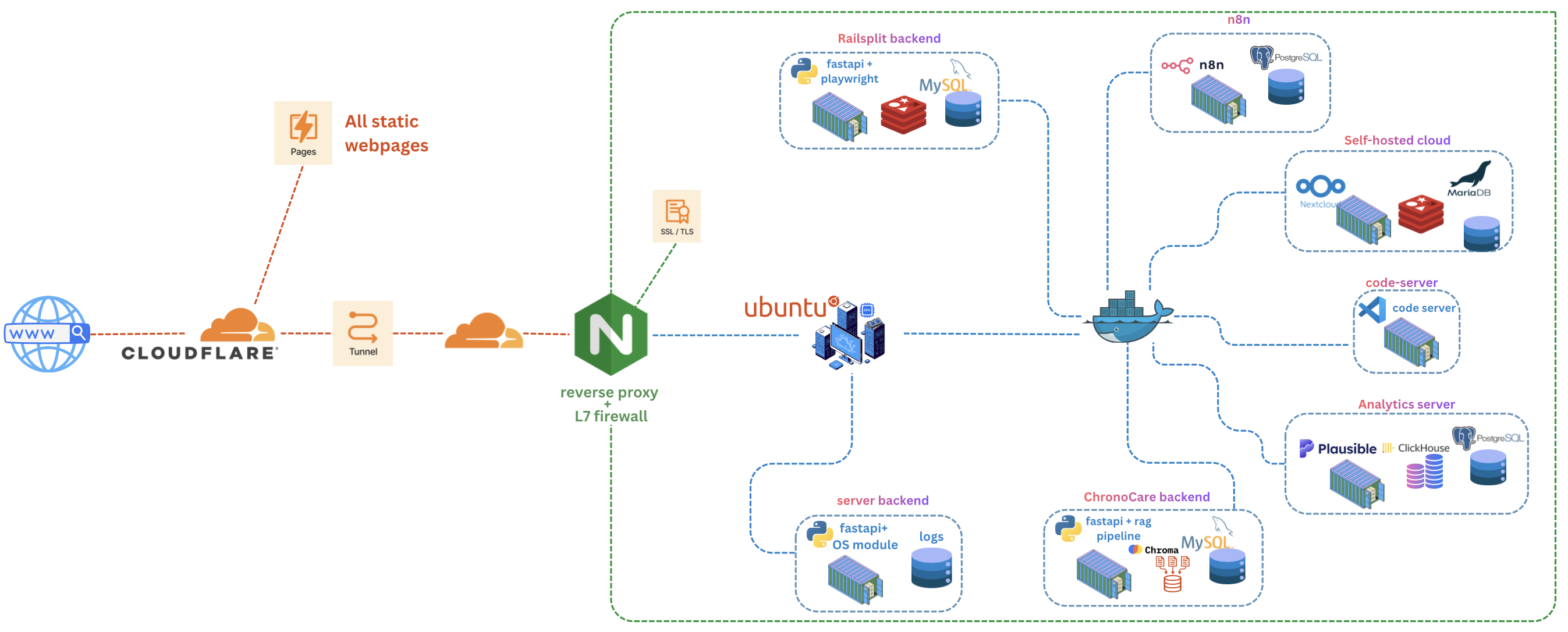
This is a local self-hosted server used for learning, experimentation, and running real production services. The infrastructure provides hands-on experience with system administration, networking, and DevOps practices while serving actual applications to users.
Services are exposed securely to the internet using Cloudflare Tunnel without opening any inbound ports on the router or firewall. This eliminates the need for port forwarding and provides an additional layer of security through Cloudflare's edge network.
Cloudflare acts as the public-facing endpoint, routing requests through an encrypted tunnel to the local server. Nginx then handles internal routing to appropriate services based on hostname and path.